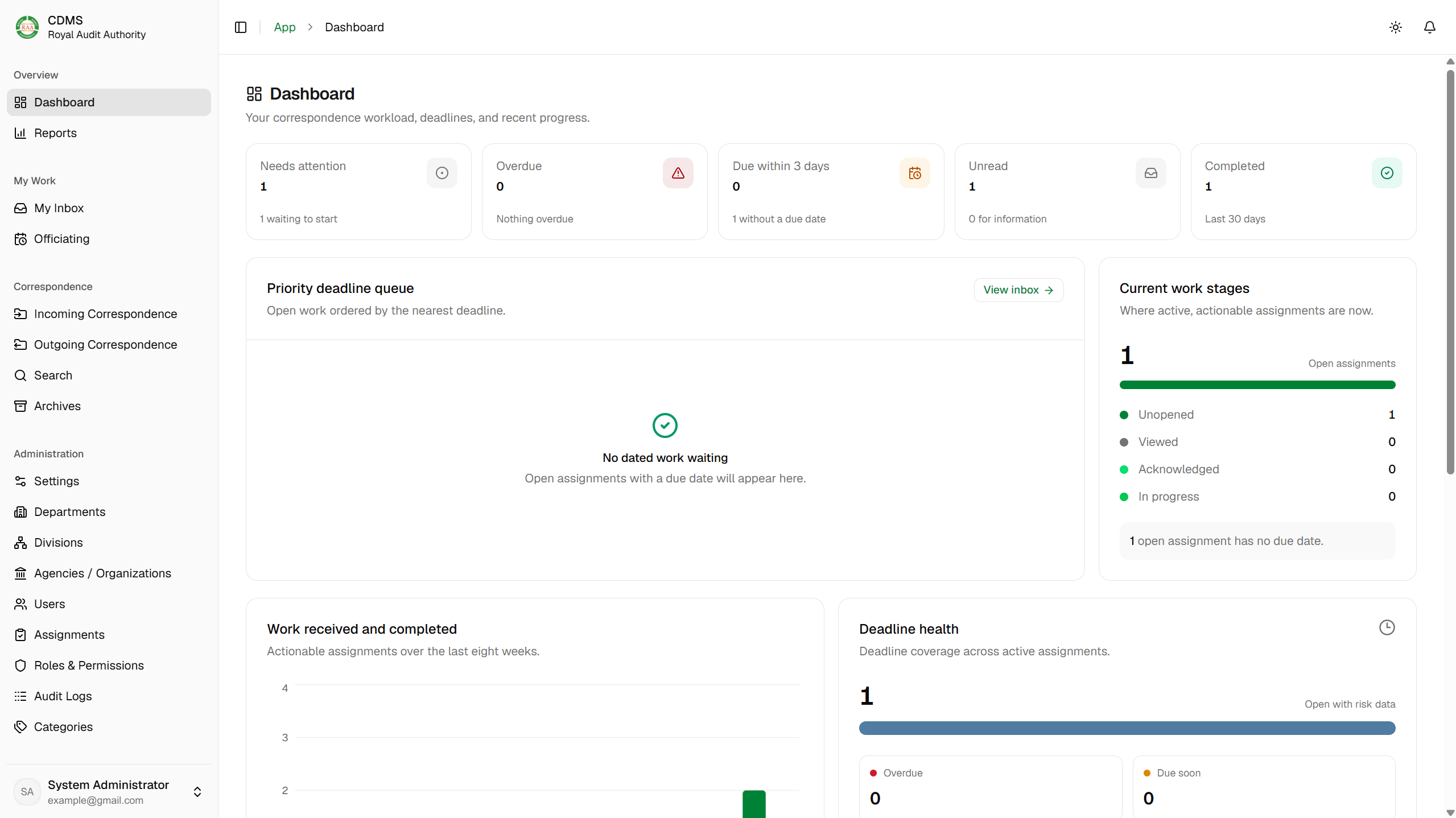
I led full-stack development of the Correspondence & Document Management System during my internship at the Royal Audit Authority. Working with the development team and RAA officials, I helped connect document registration, review, assignment, approval, search, and archiving in one application, with OCR-assisted intake and a history of the decisions behind each letter.
- Client & programme
- Royal Audit Authority, Bhutan
- My role
- Team lead & full-stack developer
- Collaboration
- Development team & RAA officials
- Project status
- Developed & deployed
The problem
Keep correspondence connected throughout its lifecycle.
An official letter carries more than its document: it has registration details, recipients, review decisions, assigned work, and a completion status. Staff need to understand what the letter concerns, who is responsible for the next action, and which decisions have already been made.
CDMS brings these parts together for incoming and outgoing correspondence. The application connects the original files, editable metadata, assignments, remarks, and activity history, giving authorized staff a consistent place to register, review, follow up, and retrieve records.
My contribution
Translate operational requirements into usable workflows.
My internship at RAA ran from 29 June to 4 August 2026. As team lead and full-stack developer, I worked across the React and TypeScript frontend, NestJS backend, and PostgreSQL data layer. I collaborated with RAA officials to translate operational requirements into application features.
My contribution covered registration, routing, assignment, approval, official numbering, document generation, search, and archiving. I also integrated OCR-assisted data entry, file management, reports, notifications, role-based access, and audit history, alongside deployment work.
The project was collaborative. My leadership and implementation work formed part of a shared development effort, with feedback from the people responsible for the correspondence process.
Incoming correspondence
From an uploaded letter to an accountable assignment.
Incoming registration places the document alongside its details so registry staff can check the information before submitting it for review. The record then follows the appropriate review and assignment path, keeping progress and remarks connected to the letter.
Upload and review
Upload the incoming PDF, review the suggested subject, reference, date, and sender, and correct the information before registration.
Register and route
Complete the required details and submit the correspondence for review, with its document and registration information kept together.
Assign and follow up
Authorized reviewers route work to the responsible recipients. Assigned staff can record progress, add remarks, and complete or forward their work as permitted.
Complete and retain
Required work is completed before the record reaches completion. Search and archives provide a route back to the correspondence and its history.
Outgoing correspondence
Separate drafting, approval, and the official document.
Outgoing correspondence starts with a DOCX draft and a PDF preview. Staff complete the letter details, choose recipients, and submit the draft for approval. Reviewers can approve it, reject it, or return it for correction before finalization.
Finalization connects official numbering with the generated document files. Keeping the draft and final documents distinct makes it easier to follow the approval process and identify the version intended for issue.
Internal correspondence reaches recipients through application inboxes. For correspondence sent outside the application, staff can record administrative completion after sending it. That action records the staff member's completion step; it does not independently confirm receipt by the external recipient.
OCR & document processing
Assist data entry while keeping people in the review loop.
Document processing supports both digital PDFs and scanned material. Text extraction and OCR help prepare candidate fields for the correspondence form, reducing the need to begin every registration with an empty set of fields.
The suggestions remain editable. Registry staff review them against the document and confirm the details before registration, making human review part of the workflow rather than treating recognized text as automatically correct.
I integrated OCR-assisted processing into the application workflow. The recognition capability is separate from the correspondence application's responsibility for reviewing information and maintaining the business record. Document extraction and conversion run in the background, with processing states surfaced to the interface.
Access & coordination
Connect the right person to the right action.
Role-based permissions guide access to correspondence, documents, inboxes, and workflow actions. The application considers organizational responsibility and assigned work so that routing and review stay connected to the people authorized to perform them.
Notifications and personal work views help staff find assignments that need attention. Remarks and activity history retain the context around a handoff, so the next recipient can understand the work already completed.
- Clear ownership
- Assignments identify who is responsible for reviewing or acting on a letter, alongside the correspondence record.
- Controlled document access
- Previews, supporting attachments, and downloads follow the authorized access to the correspondence they belong to.
- Traceable handoffs
- Review decisions, progress notes, and completion remarks help preserve the context as work moves between recipients.
Search & reporting
Support daily follow-up and later retrieval.
Search and archive views help authorized staff retrieve correspondence beyond their immediate inbox. The document remains connected to its metadata, assignments, related correspondence, and activity history, supporting both current work and historical reference.
Dashboards and reports bring together correspondence status, workload, and completion information. Filters and exports support follow-up, while audit history provides a record of actions associated with the application workflows.
Delivery & reflection
A connected correspondence application, delivered through collaboration.
The project brought incoming registration, outgoing approvals, document processing, assignments, retrieval, and reporting into a web-based system. My work included deployment as well as the application features developed during the internship.
RAA recognized my contribution to CDMS with a Certificate of Appreciation on 31 July 2026. Working with officials and teammates helped connect technical implementation to the responsibilities and decisions involved in official correspondence.
The main engineering lesson was to design around the whole document lifecycle: a successful upload is only the beginning. Review, ownership, correction, completion, and later retrieval all need to remain connected for the application to be useful.